The Myth of the Empty Inbox as a Finished Day
An empty inbox is a weak measure of meaningful progress. Define what done means for chosen work so your attention follows priorities, not arrivals.

An empty inbox can make a workday feel complete even when the work you chose remains untouched. The empty inbox myth is easy to believe because messages arrive in visible batches, while meaningful progress may leave no tidy trace on screen.
Treat email as a source of requests and information, not as the day’s scorecard. A separate definition of done gives your attention a more reliable way to recognize progress.
Messages measure arrivals, not importance
Your inbox records what other people send and what automated systems deliver. It does not sort those items by how much they matter to your commitments, or how much concentration they demand.
A quick reply can clear a message while barely advancing a project. Conversely, drafting a proposal, resolving a difficult decision, or preparing for a conversation may take sustained attention without producing an inbox change at all.
That mismatch can quietly steer the day. Each new message offers a small, visible task; chosen work may feel less urgent because its next step is less obvious. Responding to every arrival first can leave the most consequential work waiting until attention is worn thin.
Define done before the work begins
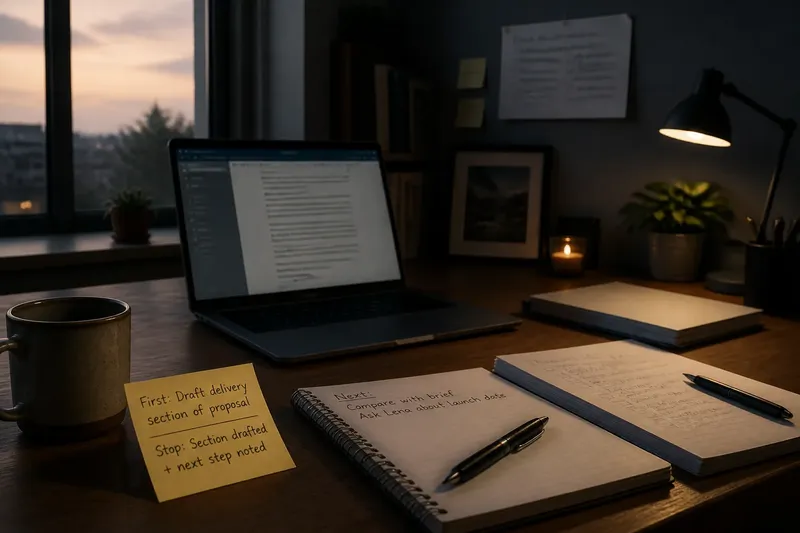
For chosen work, describe a result you can recognize rather than a vague effort you can endlessly extend. “Work on the presentation” can expand to fill available time. “Draft the opening and mark the two decisions that need input” gives the task a visible endpoint.
Make the endpoint fit the size and nature of the work. A report may be done for today when the outline and evidence gaps are clear, even if review comes later. A hiring decision may be done when you have compared the agreed criteria and recorded what remains uncertain, not when every discomfort has disappeared.
Useful definitions of done usually include:
- A concrete artifact: a draft, decision note, marked-up file, or completed handoff.
- A boundary: the portion you intend to complete in this work session.
- A quality threshold: what must be checked before you stop.
- A visible next move: what happens next if the larger effort is not finished.
These details keep “done” from meaning either “I spent time on it” or “I polished it forever.” For work with formal requirements, use the relevant instructions or review process to set the quality threshold.
Keep inbox completion in its own lane
Email can still have a clear stopping point. Decide what counts as processed for your role: perhaps a message is answered, assigned, saved for a specific follow-up, or recognized as informational. Processing does not require treating every message as equally urgent or answering each one immediately.
Use the tools you already have. In Gmail, a label can separate messages that need a response from reference material; in Outlook, a flag can mark a follow-up that belongs on your task list. An archive is useful when a message needs no action, but archiving is not proof that the underlying work is complete.
Keep commitments outside the inbox when they need attention beyond a reply. A message requesting a draft can become a task with its own definition of done. That way, clearing the request from view does not make the work disappear from your plans.
Separate a useful stopping point from an empty inbox
At the end of a work period, check the chosen work against its own endpoint. Record what is complete, what remains, and the next action if the task is continuing. Then review the inbox for commitments that need to be captured, rather than trying to force every message into a finished state.
Say you planned to prepare a client briefing, but several new messages arrive about routine scheduling. You finish a draft of the briefing’s recommendation, note that one assumption needs confirmation, and capture that follow-up for tomorrow. The inbox may still contain unread messages, but the chosen work has reached a useful stopping point and its remaining dependency is visible.
This approach also makes partial progress easier to judge. If the recommendation is still unclear, write down the specific question blocking it; “not finished” then describes the work honestly without erasing what you learned.
What should count as done when a task is ongoing?
How do I define done for work that has no final endpoint?
Choose a bounded contribution for the current session, such as resolving one decision or preparing a reviewable draft. Note the next action so the larger effort can continue without pretending it is complete.
Should I clear email before starting focused work?
That depends on your responsibilities and whether messages carry time-sensitive commitments. If no immediate response is required, capture any real task and protect a period for the work you chose rather than clearing messages by default.
What if a request arrives while I am working?
Check whether it needs attention now, later, or not at all, using the expectations attached to your role. If it can wait, record the next action in a trusted task system and return to the current endpoint.
How can I tell whether I am polishing past the useful point?
Compare the current draft with the quality threshold you set before starting. If it meets that threshold and the next improvement would not change its purpose or readiness, stop and record any optional refinement separately.
Let progress be visible without making it performative
A short end-of-day note can name the completed artifact, the decision made, or the obstacle clarified. Keep it factual and brief; the point is to make progress legible to yourself, not to create another reporting ritual.
The empty inbox myth loses its grip when chosen work has a clear finish line of its own. Use the inbox to manage incoming commitments, and use your definition of done to see whether the attention you spent moved something that mattered.