The First Ten Minutes: Giving a Workday a Clear Starting Point
A clear workday start helps you choose one opening task, set a stopping point, and keep incoming messages from deciding your priorities by default.
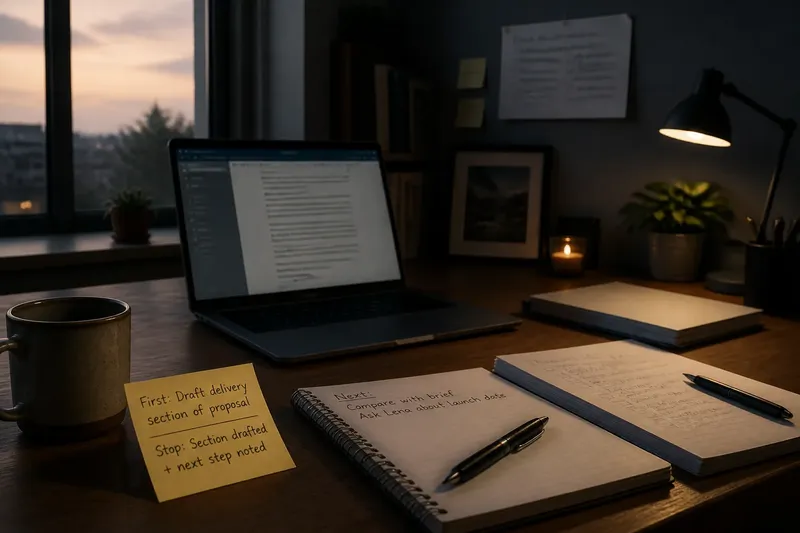
A clear workday start begins with one task and a visible stopping point, not an open inbox. Before opening email or chat, name the action you will take and what result will tell you it is time to pause and choose what comes next.
The right first move depends on what is uncertain. You might already know your priority, need to remove a specific obstacle, or need to check whether new information changes the plan.
A clear workday start begins with one decision
Choose a task that is small enough to begin promptly but connected to meaningful work. “Work on the client proposal” is broad; “open the proposal and draft the delivery section” gives you a recognizable first action.
Set a stopping point you can see, such as a drafted section, a list of questions for a colleague, or a choice between two approaches. “Work until it feels finished” offers no clear cue to pause and reassess.
Write the action and stopping point somewhere easy to see, such as a sticky note, a paper notebook, Apple Notes, or Google Keep. Use a tool you already reach for rather than building a new system to maintain.
Use a planned priority when the next action is clear
If you already know what deserves attention, start with the first concrete action on that task. Drafting, reviewing a design, preparing a lesson, or working through a decision can all benefit from a quiet opening.
Before leaving work, write a brief instruction for the next morning. “Review the introduction for unclear claims” tells you where to start and what to look for; “continue writing” does not.
Open only the materials needed for that action. For a document revision, that might mean the document and a style guide, rather than every chat window and browser tab.
Decide in advance what counts as a pause: perhaps the introduction has been revised and a note about the next section is in place. If a time-sensitive request changes the priority, update your plan rather than following the note at all costs.
Use preparation to remove a real barrier
Preparation is useful when a specific obstacle stands between you and the main work: missing materials, an unanswered question, or input you need from someone else. It should produce something that lets you begin, not an open-ended session of getting organized.
Choose an observable result. Gather the relevant files in one folder, write down the question you need answered, or mark the report section that needs review. Stop when that result is ready and move to the main task.
Say you need to draft a meeting agenda but cannot recall which decisions remain open. Open the last meeting notes, write down the unresolved decisions, then use those points to begin the agenda. The result is a short set of agenda prompts; if the notes do not identify any open decisions, the next action is to ask the meeting owner what the agenda must resolve.
If you already know how to start and setup is becoming a way to delay, open the document and begin. Preparation should reduce friction, not remove every uncertainty.
Use a bounded message scan when updates could change the plan
A message check can be a sensible opening if your role depends on incoming information. Look for a changed deadline, a blocked colleague, or a revised meeting plan—details that could alter what should happen first.
Before opening email or chat, decide what you are scanning for and what ends the scan. For example, stop once you have identified any time-sensitive issue and written a response plan for other messages.
A notification is a prompt to assess, not a priority by itself. If a message truly needs prompt action, handle or route it according to your role; if it can wait, note when you will return to it.
If no one is relying on an immediate response and the work needs concentration, choose your task before opening messages. Follow your workplace’s response expectations and procedures for urgent requests.
Choose your opening task by checking what is uncertain
Identify what you need to know before you can move: the next action, the materials, or whether an incoming issue changes the plan. Use the observation to decide what to do, and choose a specific alternative if the situation differs.
- The next action is clear: If you can name a concrete first action, begin the planned priority; if you cannot, rewrite the task as an action, such as comparing two draft outlines.
- A necessary file or tool is missing: If the missing item blocks progress, request it or locate it, then begin when it is available; if the main task can proceed without it, start on the unblocked part.
- A question prevents a sound first move: If one answer would clarify what to do, write the question and ask the right person; if the answer is not needed yet, start the portion you can complete without it.
- Incoming requests may change the order: If a message signals a genuine time-sensitive issue, handle or route it under your role’s procedures; if no message changes the plan, return to the planned task.
- The task feels vague: If you cannot point to an observable first action, break it down into one, such as listing the decisions a report must support; if you can name the action, begin rather than planning further.
- More than one condition applies: If one small action resolves the most important uncertainty, do that first; if it does not, choose the next action that addresses the remaining blocker.
This decision is about the opening move, not a demand to map the whole day. Once you reach the stopping point, use what you learned to decide what deserves attention next.
Make the stopping point useful
A stopping point should describe evidence of progress, not a mood or an arbitrary demand to finish a large project. It could be a first draft, a list of questions, or a decision that needs another person’s input.
Leave a brief next-step note, such as “ask Lena to confirm the launch date” or “compare the revised opening with the brief.” That cue makes it easier to resume without reconstructing the task.
If an obstacle appears, adjust the plan based on what you can observe. If a key file is missing, request it and note what work remains possible while you wait; do not keep pushing at a blocked task simply because it was written down first.
A timer can remind you to pause, but the useful boundary is the visible result and the decision that follows it. Keep the process simple enough to use without extra recordkeeping.
What should you do when the morning changes?
What if an urgent request arrives as I begin?
Check what makes the request urgent and whether it changes your first task. If it does, handle or route it according to your role, then update your note with the next action so you can resume without rebuilding the plan.
Should I open email before choosing my first task?
Check messages first if incoming information could materially change what deserves attention or your job requires a regular check. Otherwise, choose your opening task before opening the inbox and decide when messages fit into the day.
What if I cannot tell which task matters most?
Take a small action that clarifies the choice, such as listing deadlines, identifying who is blocked, or writing down the unresolved question. Stop once you have enough information to choose the next move; you do not need to settle every priority at once.
How do I restart after an interruption?
Read the visible task and stopping point, then take the next written action. If the interruption changed the situation, revise the note first so you do not resume a plan that no longer fits.
Leave a useful cue for the next workday
A repeatable start does not require the same first task every morning. It requires a brief choice about the kind of first move that fits the day, followed by a stopping point that makes reassessment straightforward.
Imagine you have to revise a project brief, but a decision from a colleague may change the scope. Your starting input is the current brief and the unanswered scope question. Write “check for a scope decision; if none, revise the audience section” on a note, then open the relevant message thread: if the decision is there, update the brief to match it; if it is not, revise the audience section and record that the scope question remains open. The resulting choice is visible either way—act on the decision you received, or make progress while noting what still needs confirmation.
Before leaving work, write one sentence with tomorrow’s first action and its stopping point. If the work is uncertain, name the question the opening task should answer; if an incoming update could change the order, say which kind of update matters. That note gives your next clear workday start a useful cue before the inbox supplies one of its own.